Overview
Centralized AI Agent Platform Extreme Exchange provides a unified platform for discovering, managing, and creating AI agents easily.
Key Functional Components
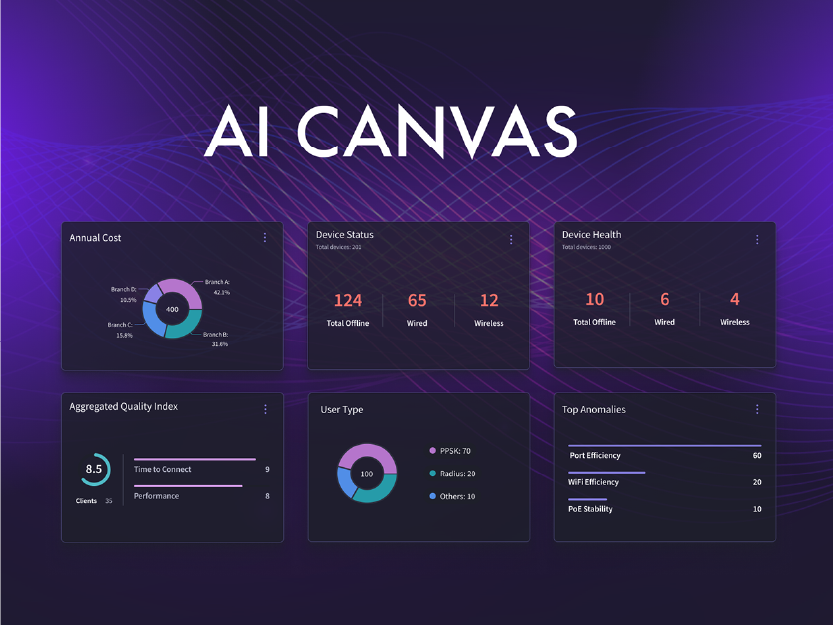
The platform features a Catalogue, Dashboard, Flow Builder, Community, and Resources for comprehensive AI agent management.
Community and Collaboration
Community section fosters collaboration and sharing insights among users to drive innovation.
Challenge
Fragmented AI Agent Systems
Existing solutions were complex and fragmented, causing inefficiencies and poor user engagement.
Need for Centralized Platform
Users required a unified platform to discover, manage, and monitor AI agents easily.
User-Friendly Workflow Building
Building custom workflows needed to be simple without deep technical skills for diverse users.
Community Engagement and Support
Engaging a community for support and innovation was critical for user success and collaboration.
User Research and Personas
Conducted detailed user research to identify needs and created personas to guide design choices effectively.
Information Architecture
Developed a comprehensive information architecture to organize content and improve navigation flow.
User Flows and Wireframes
Designed user fl ows and wireframes to map key interactions and visualize layout and functionality.
High-Fidelity Mockups
Delivered polished high-fi delity mockups aligned with brand guidelines to ensure intuitive user experience.
My Role
User Research and Personas
Conducted detailed user research to identify needs and created personas to guide design choices effectively.
Informational Architecture
Developed a comprehensive information architecture to organize content and improve navigation flow.
High-Fidelity Mockups
Delivered polished high-fidelity mockups aligned with brand guidelines to ensure intuitive user experience.
Research and Personas
User Research Methods
Extensive interviews and surveys gathered insights into user behaviours, needs, and challenges.
Primary Personas
Four personas are defined: Networks Ops, Security Ops, Network Architect, Account Manager representing user types.
Key User Pain Points
Identified pain points include tool complexity, poor agent performance visibility, and resource access difficulty.
Information Architecture
Clear Navigation Structure
The platform's content was divided into five main sections for effi cient user navigation and reduced cognitive load.
Catalogue Functionality
The Catalog section allows filtering and searching AI agents by functionality and ratings for quick access.
Dashboard Updates
The Dashboard provides real-time metrics and status updates to keep users informed about their activities.
Workflow Management
Flow Builder enables users to create and manage workflows easily, enhancing productivity and control.
High-Fidelity Mockups
Mockups incorporated branding with colour, typography, and icons defined by fully developed high-scale Design System to ensure clarity, accessibility, and scalability.
Design Alignment
Final mockups served as blueprints, aligning design vision across teams for seamless development.
Post-Design User Testing
After launching the live environment, we conducted usability testing to validate design decisions and uncover improvement opportunities. Feedback was synthesized into actionable recommendations andorganized using a Kanban workflow for clarity and prioritization.
The board included columns for:
Recommended Changes:
Initial suggestions from testing (e.g., improve settings menu descriptions, allowdeeper configuration of critical functions).
Prioritized for Action:
High-impact items requiring immediate attention (e.g., agent customization tooltips,adding contextual information before activation).
In Progress:
Changes actively being implemented (e.g., providing more metrics and personalization options).
On Hold:
Items deferred for future iterations (e.g., icon consistency across navigation).
Done:
Completed fixes (e.g., resolving confusing agent layout customization).
Blockers:
Items that could not proceed due to dependencies (none identified in this round).
This structured approach ensured transparency, efficient collaboration, and continuous improvement of the user experience.
Key UX Decisions
Real-Time KPI Dashboard
The dashboard focuses on real-time KPIs to help users make quick and informed decisions.
Drag-and-Drop Flow Builder
The flow builder offers a drag-and-drop interface to simplify workflow creation for non-technical users.
Community Collaboration
Discussion threads and resource links foster collaboration and knowledge sharing among users.
User-Centered Design
Decisions were guided by user research and validated through testing to ensure usability and engagement.
Impact
Improved AI Agent Discoverability
Discoverability of AI agents increased by 40%, helping users find relevant tools faster and easier.
Reduced Workflow Creation Time
Workflow creation time was cut by 50% due to an intuitive Flow Builder interface enhancing efficiency.
Increased User Engagement
User engagement improved significantly through community features and easily accessible resources.